Design Features
Development software; part of the Soloist platform
Deploy complex single-axis motion control processes
Connect to and deploy programs to a variety of Soloist controller/drive hardware products
Manage the connection and configuration of interface to Ethernet/IP industrial fieldbus networks
Set up and configure drives with powerful configuration tools
Deploy powerful real-time application solutions
Integrate motion and process tool control with the AeroBasic programming language
The Power to Differentiate Your Process
The Soloist Motion Composer Suite is the development solution your motion control application needs. Part of the Soloist single-axis motion control platform, the Motion Composer Suite allows you to deploy advanced automation that outpaces competitive solutions. The suite includes the following products:
Powerful Technology, Simply Integrated
The Soloist solution is a powerful performance tool that can be simply integrated into your system. The Motion Composer Suite gives you more precision at your fingertips through a user-friendly interface with tools for each aspect of your development process. Using the Motion Composer Suite, you can deploy real-time application code to a smart, single-axis drive which includes an integrated controller. This smart drive easily communicates with your larger automation control system.
Connect and Go
Setting up your smart drive solution is easy. Quickly set up drives, motors, and stages with the Configuration Manager application. This is just one of several tools integrated in the Motion Composer Suite that makes drive, controller, and servo configuration fast and effective.
Setting up an automation process is also quick and easy. The Soloist smart drives include an integrated controller that can talk over EtherNet/IP, Ethernet TCP/IP, RS-232, RS-485, and Modbus TCP.
Fieldbus I/O and expandable I/O on Aerotech drive hardware is directly accessible within the AeroBasic real-time programming language.
Develop and Test Real-Time Applications
The Soloist Motion Composer Suite includes a powerful environment for real-time developers. The Motion Composer IDE allows real-time application code to be developed, debugged, and deployed to the smart drive.
Note: For developers who aren’t working at the real-time level and prefer a standard programming language, the smart drive can be accessed via .NET, C, and C++ libraries; a MATLAB library; and LabVIEW VIs.
Tune and Optimize Your Process
Optimize motor setup and servo performance with the Digital Scope’s optimization tools. Ensure that your motor is phased and commutating correctly and that the encoder is optimized for performance. Continue to optimize by evaluating the servo loop and using powerful loop shaping tools to maximize performance.
Or take the easy route. Use Aerotech’s EasyTune one-button servo optimizer that makes tuning simple.
Getting Results
The Motion Composer Suite can optimize applications that use different types of motion: torque control, velocity control, point to point, contoured, or holding position. Motion programs are run with the IDE while the Digital Scope collects position, velocity, current, acceleration commands, feedback, and error. The results are plotted and Fourier transforms are performed to see any troublesome frequency content.
Relationship-Driven Support
During each phase of your development process and your machine’s operational life cycle, we have a team ready to support your needs. Our Field Sales and Application team is an extension of your design team even while you are still considering solution options for your system.
When engineering your solution, Aerotech continues to serve as a resource to your team. We can be brought on as a design partner, or we can offer a simple consultation. Customers use our system engineering expertise to expand upon their own capabilities.

As you build, commission, operate, and service your system, Aerotech’s Global Technical Support team supports and guides your efforts. We have technology experts that can optimize your process and develop code for your machine.Set Up Your Devices
Use the Configuration Manager to set up and manage all of the devices in your automation solution. Parameters that are stored on the smart drive electronics are set up and managed with this tool. Help is easy to access. Simply click on the item you are setting up and the help screen updates with detailed, relevant content.

Don’t Guess. Calculate!
Aerotech makes setting up a single-axis solution simple. Quickly set up your motor and stage with the Axis Parameter Calculator. All of Aerotech’s mechanical stage products are included in a detailed database accessible through this tool. Choose your mechanics and verify the load, motor, drive, programming units, feedback type, servo-loop target performance, and (optional) current-loop target performance. Click “apply” and you’re done. Your system is now ready for detailed tuning and optimization.

Single Button Simplicity
Simplify the process of tuning and optimizing your motor through a series of single push-button tools. Some of the tools’ functionalities include:
Setting up proper motor phasing
Correcting Lissajous errors from analog encoders
Tuning the motor
Running a loop transmission
Best-fitting filters based on a loop transmission
Know What You’re Working With
Aerotech’s Motor Phasing Calculator is used to verify incorrectly wired motors. With the push of a button, this calculator identifies and compensates for unexpected motor power wiring and misalignment between the motor phasing and the feedback device. These corrections are accessible through the push of a button and are required checks for AC brushless motors with and without Hall effect switches.

Feedback You Can Trust
Performance of an analog sine-wave encoder is optimized when the Lissajous pattern is correct. A process that once required an oscilloscope is now performed with a single click of a mouse. The Feedback Tuning tool applies a simple move to the stage and graphically displays a Lissajous pattern with the correct phase and amplitude adjustments.

EasyTune
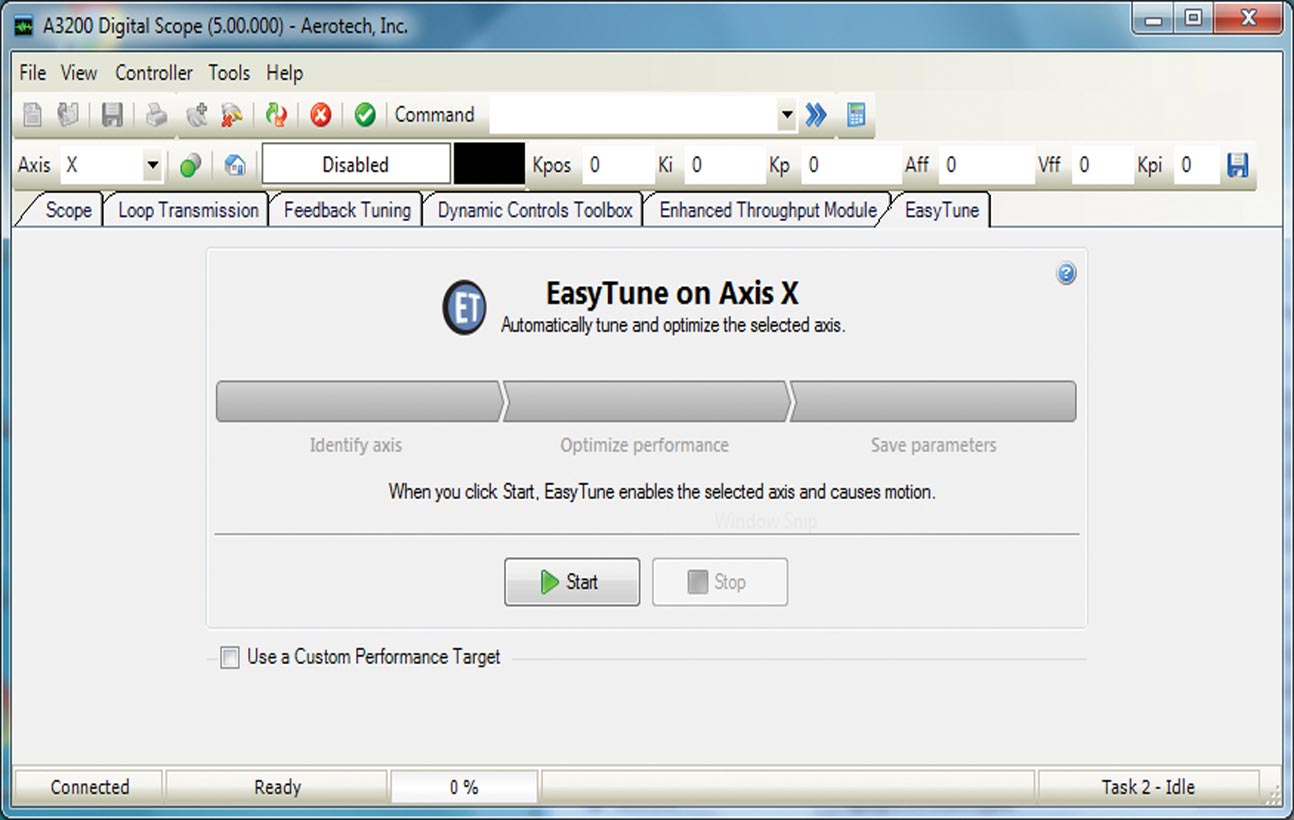
EasyTune® is the most advanced autotuning tool available. Entirely data-driven, the algorithm mimics the process followed by an experienced controls engineer. EasyTune begins with a system identification operation. It continues with the development of a baseline stabilizing controller followed by progressively more sophisticated compensation via loop-shaping procedures.
In just minutes, the system has the highest bandwidth practical, all with no input from the user!
Advanced Tuning for Advanced Users
For users who prefer or require becoming more familiar with servomotor tuning, advanced tuning tools are available.
The Soloist supports 11 different response types, five different digital filter types, plus the ability to autofit digital filters, two different excitation methods, pole-zero plots, quick loop-shaping tools, and many more advanced features. These advanced tools make it simple to evaluate and optimize complicated systems.
Aerotech can work with you to optimize your system. Not only do we have powerful tools, but we also have motion control experts that are partners in your success.

Powerful Programming
The Soloist Motion Composer IDE is a powerful part of the software suite for developing a motion control program. With the Motion Composer IDE you can write and debug programs, use standard program controls (start, stop, pause, compile, etc.), and use breakpoints, step into, step over, and syntax highlighting.

More than Motion
The ability to combine motion control with process tools and automation makes the AeroBasic™ programming language the motion control industry’s most powerful tool. Access language features such as program flow control, a TCP/IP communication library, math functions, I/O commands, file and serial port communications commands, and several advanced controller features.
Additional features include a detailed error explanation, full diagnostic debugging tools, a watch window that shows variable values for easy debugging, and a link to the help file for a description of the error.Debugging & Optimizing
Debug Your Automation Programs
The IDE includes powerful tools to help you review and debug your programs. You can insert breakpoints, run and pause your program, step into or step over subroutines, and toggle breakpoints. All of these debug features are easily accessible on a top-level menu bar in the IDE.

Optimize Your Motion
Building a motion control solution requires your motion to be optimized. In the motion control world, throughput and accuracy are two important considerations.
The Digital Scope application has tools to detect how well the system is moving. Collect and analyze more than 60 standard axis signals and 10 standard task signals with a software oscilloscope capable of FFT analysis.
Seeing this feedback allows you to determine how well your motion system is following the desired path, how fast it is settling into position, or how well it is holding a target position. When things aren’t working the way intended, you can monitor signals such as velocity feedback and current command feedback to get an idea of what could be causing the error.
Use the Scope tab in the Digital Scope in combination with Aerotech’s different tuning tools to optimize performance.

Tools, Tools, and More Tools
Built for Expansion
The Catalog Manager lets you add an unlimited number of devices to your library. Use the Axis Parameter Calculator to quickly set up the motors and stages that you added to your device database.

Programming Libraries
.NET, C, and C++ Libraries
Aerotech’s standard controllers are flexible enough to handle almost any control application. Aerotech motion controllers provide the flexibility and power required for today’s automation challenges, and it is all accessible through powerful programming libraries.
MATLAB® Library and LabVIEW® VIs
Users who program in MATLAB and LabVIEW can benefit from Aerotech’s powerful motion control tools. Integrate into your native environment with well-documented libraries.
Specifications
Soloist Motion Composer Suite Minimum PC Requirements
To install and run the Soloist software, you must have administrative privileges for installation and your PC must have the following minimum requirements:| | Requirements |
|---|
| Processor | Intel Pentium 4 or faster |
| Operating Systems | 32-bit or 64-bit version of one of the following: Other operating systems are not supported |
| Graphic Display | 1024 × 768 pixels or higher resolution |
| Hard Disk Space | 500 MB available disk space |
| Microsoft Internet Explorer | Internet Explorer 6 or later1 |
| Required Peripherals | Keyboard, mouse and CD-ROM drive |
Soloist Motion Composer Suite Software License Specifications
| Option | Configuration | Description |
|---|
| Soloist | Order Entry Point | Full installation of the Soloist Motion Composer Suite and unlocks certain features on the Soloist drive-based controllers Pricing is summation of selected products. Maintenance (software update) included in price for one year from date of purchase. Soloist Motion Composer Suite is intended for deployment on desktop or industrial PCs. Includes: The Soloist is not multilingual and cannot be used in applications that require a native-language user interface. |
| License | Machine | Contains both the Soloist Motion Composer Suite and options that enable features on a Soloist Drive-Based Controller. Provides the ability to: Write, compile, execute, debug programs in AeroBasic Full access to .NET, C, and C++ libraries Access full diagnostics, fault, and status information Access and set I/O, registers, and variables Collect, analyze, and save data View files from machine for analysis and record keeping Connect PC to machine through Ethernet TCP/IP or USB Upgrades can be installed (firmware or controller) using loader
|
| Machine Upgrade | Used to change configuration options on an existing machine license
Requires the current license ID from customer
Price is based on the new options added
Maintenance extension is a separate line item |
| Machine Addition | Increases the number of seats associated with an existing key |
| License Extension | Extends the maintenance period on an existing license
Can be purchased in yearly increments |
| Media Only | License ID distributed on the specified media |
Soloist Configuration Manager Features
Use Configuration Manager to change parameter files, parameters on a controller, connection settings, and security options.
The main menu and toolbars give you access to almost all of the features that are available in the application. Below the main menu, the Configuration Manager has four window panes or sections:Network Explorer: Set up the controller and organize files.
Viewer: Shows contextual information about the current selection in the Network Explorer. For example, when you select a parameter category, all of the parameters in that category show in the viewer.
Editor: Modify the values of different items such as the name of a controller or the value of a parameter.
Help Browser: Shows the help topic for the subject that you select in the viewer.
Configuration Manager includes the following tools/wizards:
| Item | Tools/Wizards |
|---|
| Catalog Manager | Create a catalog of motors and stages that are not standard Aerotech motors and stages |
| Connection Settings | Use the Connection Settings dialog to configure the connection settings of individual controllers and to map and un-map controllers |
| Analog and Digital Filter Calculators | Calculate coefficients for the two filters on analog and digital inputs that are available on each axis |
| Axis Parameter Calculator | The primary calculator to use to configure an axis. You can use this calculator to configure axis types that include ball-screw stage, linear stage, rotary stage, voice-coil stage, and no stage (motor only). For each axis, you can specify information about the mechanics, drive, units, feedback, servo loop, and current loop. |
| Encoder Resolution Changed Calculator | Helps users to manage changes in encoder devices and encoder resolutions. This calculator comes into view when you change certain encoder and feedback parameters. |
| Motor Phasing Calculator | Calculates the correct values for parameters which allow you to compensate for motor wiring problems |
| Scaling Factors Changed Calculator | Scales other parameters that are entered in user units to match a new CountsPerUnit value |
Soloist Motion Composer IDE Features
Soloist Motion Composer IDE is an environment for developing and debugging AeroBasic programs for Soloist controllers. It has a feature-rich program editor with the following features:
Line number indicators (for each line)
Breakpoints (indicated by a breakpoint icon)
Current Line indicator (indicates the next line to be executed)
Status bar (indicates the file path, line, column, and character number)
Syntax highlighting:
It also functions as a basic interface and can be used to do the following tasks.
Command basic motion
Inspect diagnostic information
Do basic configuration (for advanced configuration options, use Configuration Manager)
Editing Programs
Each controller task is identified by a tab. You can open program files in a specific task tab and debug programs that are running in that task. If you open files in multiple task tabs, the files are linked together. If you make changes to one file, the changes are applied to all linked files.
Building and Loading Programs
When building programs, the build file is always the active file and is always an .ab or .abl program. The Compiler output is sent to the Output Window, and errors are shown in the Error List. Loading a program builds the current AeroBasic program, loads it onto the controller, and sets the task to the Program Ready state. You can then execute the program.
Running and Debugging Programs
In the Motion Composer IDE, you can take advantage of a full suite of tools to run and debug a program.
The following actions are available for running and debugging a program:Run the selected AeroBasic program
Pause the active program
Stop the program associated with the active task
Stop all programs (on all tasks)
Toggle a breakpoint
Clear all breakpoints
Toggle line highlighting
Variable Watch
View and edit the value of Global Variables, Task Variables, Program Variables, Virtual Binary I/O Bits, and Virtual I/O Registers
Load symbols
Step Over
Executes one line of the program that is associated with the active task
For a subroutine call (CALL or FARCALL), it executes all of the subroutine and moves to the next program line
Step Into
Executes one line of the program that is associated with the active task
If the program line is a subroutine call (CALL or FARCALL), it steps one level into the subroutine
Step Out
Issue Immediate Commands
An immediate command is a one-line AeroBasic program that executes on a task. These commands are issued from the Command Box of Aerotech applications, which include Motion Composer and Digital Scope. This functionality is perfect for simple commands such as:Asynchronous motion commands
Setting parameters via AeroBasic commands
Setting variables
Setting modes (for example, absolute/incremental programming modes)
Soloist Digital Scope Features
The Soloist Digital Scope is a system analysis and tuning application that lets you optimize system performance using a collection of advanced tuning tools and features. With system analysis tools, you can plot and graphically analyze system data. With tuning tools, you can automatically calculate servo-loop and feedback device parameters.
The Digital Scope application includes a variety of utilities that let you perform analysis and tuning operations.
Scope: A Powerful Digital Oscilloscope
The Scope tool is used to collect and view 1D or 2D data. The Configure Data Collection tool gives you access to all Axis, System, and Task data items. Customize the signals that you are interested in seeing, the resolution of collection, the number of points, and how the signals will appear on your visual plotter. Enjoy zoom in, zoom out, zoom extents, and dual cursor controls as you evaluate your data in 1D or 2D format. Quickly switch between 1D and 2D and perform Fourier Transforms on collected signals.
Integrate data collection when using Step Forward, Step Back, and Auto Step controls. These tools allow you to configure simple axis motion and coordinates data collection, as configured with that motion.
The Scope Tool also provides the capability to autotune the servo loop of an axis. Use autotune to calculate a set of servo loop gains. Simply excite the axis using a predefined input. The output is measured and new servo loop gains are calculated by the autotune feature.
EasyTune: More Automatic than Autotuning
EasyTune is a one-button tool that automatically tunes and optimizes an axis. When EasyTune is finished, the optimized servo gains and servo filters are committed to the controller.
Loop Transmission: For Those Who Analyze
Use the Loop Transmission utility to analyze the characteristics of the servo loop and the associated mechanical system. The Loop Transmission measures the response of the servo loop. Signals are sampled and displayed for magnitude and phase analysis.
Powerful “loop shaping” tools are available to the user. These tools work with the existing data and show a prediction of an updated loop transmission response plot should new servo gains and parameters be applied. These loop shaping tools include:
Warnings for feedback data that indicate unstable behavior
Single button optimization of the servo loop gains and digital filters
Single button assignment of all digital filters
Graphical shifts of the predicted open-loop magnitude and phase
Graphical additions of Low Pass, Notch, Lead Lag, and Resonant filters
Direct editing of the digital filters in the frequency response plotter utility
The ability to overlap multiple loop transmission plots
Feedback Tuning: Removing Error from Precision Feedback Devices
Tune the feedback device signals so that optimum performance can be achieved. This utility can only be used with analog feedback devices. The goal of the feedback tuning utility is to tune the feedback device so that the Lissajous pattern received from the feedback device closely matches the ideal Lissajous circle pattern. This tuning is applicable to sine-wave encoders and resolvers. It can also be applied to situations that use dual loop sine-wave (position and velocity) tuning.
Add-On: Dynamic Controls Toolbox
The Dynamic Controls Toolbox includes a collection of controller-level algorithms designed to improve machine positioning, increase throughput, and reduce cycle times. These tools include: Harmonic Cancellation, Command Shaping, and Cross-Axis Feedforward.
Add-On: Enhanced Throughput Module
The Enhanced Throughput Module (ETM) is a physical sensor that is added to your mechanical motion system. It can improve machine throughput by measuring base or frame vibration directly and using this information in the servo control algorithm. The Enhanced Throughput Module interface in the Digital Scope allows this sensor and its input to be configured on the controller.
Ordering Information
Soloist Motion Composer Suite
| Product Name | Description |
|---|
| Soloist | Soloist Motion Composer Suite |
License Options
| Option | Description |
|---|
| License |
| -Machine | Soloist software installation on a single PC |
| -Machine upgrade | Soloist software configuration change of license |
| -Machine addition | Soloist software increase license count for existing key |
| -License extension | Soloist software extend maintenance period of license |
| -Media only | Soloist software distribute current license on media |
| Media |
| -Download | Installation media provided for download only |
| -USB | Installation media provided on a USB drive |
| -CD | Installation media provided on compact disk |
| Version |
| -Default | Current version of software/controller |
| -Legacy | Legacy version of software/controller |
| Maintenance |
| -Maintenance-X-00 | Software/controller maintenance for x year(s) after purchase where X is one through seven. One year is default. |
Drive-Based Controller Configuration
| Option | Description |
|---|
| Dynamic Controls Toolbox |
| -Dynamic Controls Toolbox | Aerotech Advanced Controls |
| Enhanced Throughput Module |
| -Enhanced Throughput Module | Setup and monitoring screens for ETM modules |
| Enhanced Tracking Control |
| -Enhanced Tracking Control | Reduced dynamic following error and settling times |
| EtherNet/IP |
| -EtherNet/IP | EtherNet/IP class 1 I/O, ASCII command and register interface objects |
Motion Composer Suite Add-Ons
| Option | Description |
|---|
| Motion Designer |
| -Motion Designer | Trajectory creation and evaluation software |
| LabVIEW |
| -LabVIEW | Includes LabVIEW 2010 (forward compatible) VI samples |
| MATLAB |
| -MATLAB | MATLAB library for motion, parameters and data collection |
Soloist Controller Connection Cable (Items Ordered Separately)
| Option | Description |
|---|
| PC to Soloist Drive/Controller Cable |
| ENET-XOVER-xx | Ethernet crossover cable (available in length xx where xx = 9, 15, 30, 45, 60, 75, or 150 dm) |
| USB-AMBM-xx | USB A-Male to B-Male cable (available in length xx where xx = 5, 10, 30, 50, or 200 dm) |